

requesting a build review
requesting a build review
this is the final step before publishing. after you finish all your tests and you deem that your build is a suitable release candidate, it must must be reviewed and approved by spawnd's team before it can go live. this ensures that all games on the platform meet a baseline of quality and technical compatibility.
how to request
- go to your game's builds screen
- find the build you want reviewed (must be in ready for testing status)
- open the actions menu
- click request review
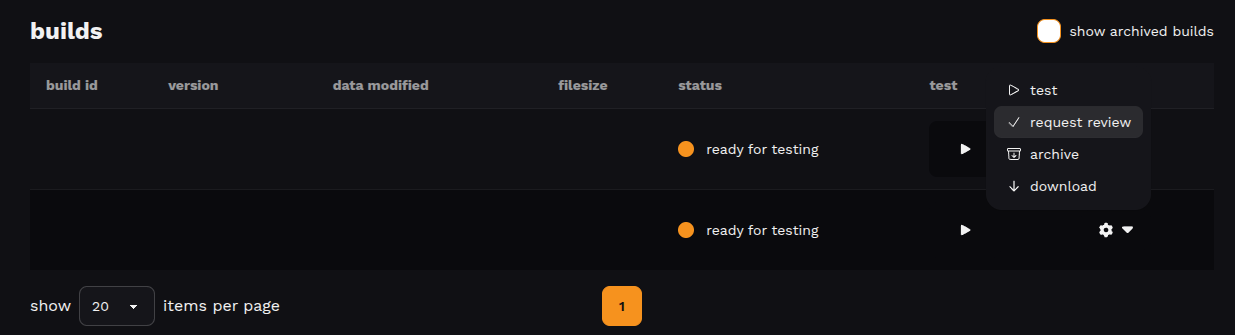
the build status will change to under review.
what spawnd's team evaluates
during review, the team checks that your build runs correctly on the platform; this includes loading behavior, basic functionality, and overall stability. the goal is to make sure players will have a smooth experience.
you'll receive an email once the review is complete. if approved, your build is cleared for publishing, and you can publish it at any time. if disapproved, check the feedback message, make the necessary changes, and upload a new build.
good to know
- make sure to test your build before requesting a review. a well-tested build has a much higher chance of being approved on the first try.
- only builds in ready for testing status can be submitted for review.
next step
once approved, you're ready to publish your build !
Updated about 2 months ago