

FMOD audio stuttering on first play (Unity WebGL)
some Unity demos may exhibit audio stuttering or crackling, especially during the first few seconds of gameplay or the first time audio events are triggered. this is a common issue when porting to WebGL, and is typically caused by an FMOD DSP buffer configuration that is not ideal for browsers.
symptoms
you may notice:
- audio stutter during the first gameplay moments
- crackling when music starts
- glitches when multiple sound events trigger at once
- issue improves after playing for a while
this is not a spawnd-specific problem, it is a known WebGL runtime constraint and is usually fixed with a simple FMOD setting adjustment.
fix: configure FMOD DSP buffer for WebGL
FMOD’s default platform settings are often tuned for desktop builds, not browser execution. to prevent stuttering, you should create a dedicated WebGL platform profile inside FMOD and adjust the DSP buffer size.
step-by-step (Unity)
- open Unity
- go to: Edit → Project Settings → FMOD Settings
- scroll to Platform Specific
- duplicate the Default platform settings and create a new target platform called: WebGL
- select the new WebGL platform profile
- under DSP Buffer Settings, set:
- DSP Buffer Length: 2048
- (leave Buffer Count as default unless you have special needs)
- ⚠️ buffer length should always be a power of 2.
- recommended values:
- 1024 - lower latency, may still stutter 2048 - best balance, usually fixes the issue 4096 - very safe, slightly higher latency
- recommended values:
below is where this setting lives in Unity:
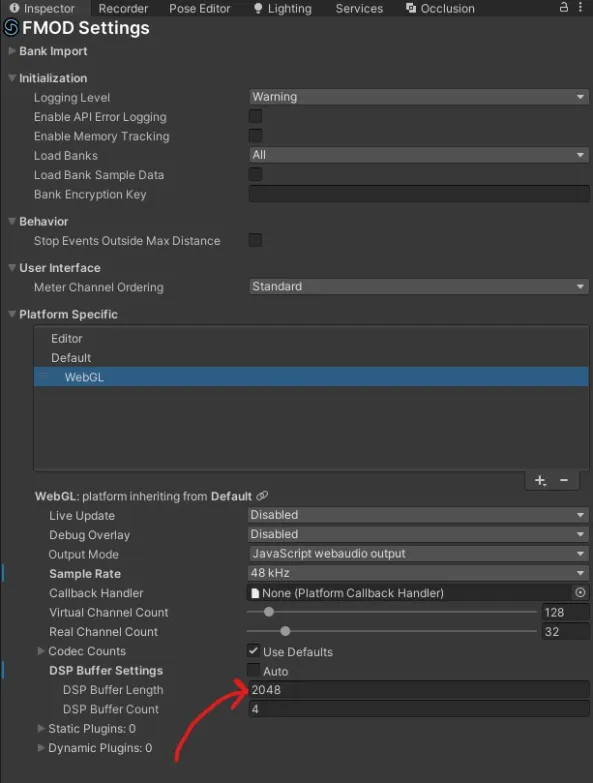
(FMOD Settings → Platform Specific → WebGL → DSP Buffer Length)
why this happens
browsers impose stricter timing and scheduling constraints than native platforms. WebGL audio threads are more sensitive to buffer underruns, especially during initial asset loading or first-time event playback. increasing the DSP buffer gives FMOD more room to stream audio smoothly.
recommendation summary
all demos using FMOD should:
- add a dedicated WebGL platform profile
- set DSP Buffer Length to 2048
- test first-play audio behavior before submission
this avoids a poor first impression for players trying the demo on web!
Updated 5 months ago