

game embedding (like YouTube!)
embed to expand: spawnd's one-click game sharing feature
spawnd's embed overview
with spawnd's game embedding feature your demo is no longer confined to a single platform: it becomes playable anywhere, instantly. just like a YouTube video, your game can now live across the web: in news articles, Reddit threads, Discord chats, fan wikis, and influencer blogs, all just one click away from fullscreen gameplay.
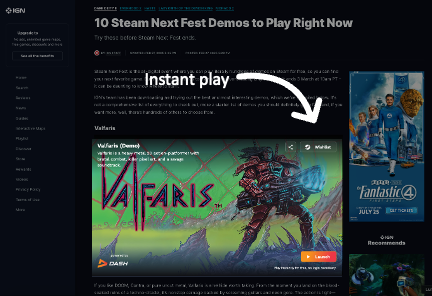
this unlocks powerful new discovery potential. your game could end up in communities and corners of the internet you never imagined, reaching players you never targeted. every embedded version is fully hosted on spawnd's infrastructure, so you don’t have to worry about traffic spikes, bandwidth limits, or security. It’s all handled by us.
"every share creates a new discovery opportunity..."
author: unknown marketing guy
with spawnd's built-in analytics, every interaction is tracked: where it was played, how long it was played, who shared it, and how it performed. Soon, every embed will carry its own attribution code, so you’ll know exactly who helped drive visibility and growth, whether it was a journalist, a fan, or a content creator.
spawnd doesn’t just help you distribute your demo: it turns the entire web into your discovery engine.
a production preview of our embedded player
here is a live example of a game embed. Try it out! 😃
try the embed code yourself:
<iframe
	src="https://www.spawnd.gg/en/games/embed/9?description=true"
	width="640"
	height="360"
	frameborder="0"
	allow="autoplay; encrypted-media; clipboard-write; clipboard-read; web-share"
	referrerpolicy="strict-origin-when-cross-origin"
	allowfullscreen>
</iframe>
embed parameters and settings
spawnd's embed currently has three main adjustable settings: the embed's language, the game description visibility, and the iframe size.
embed language
by default, the embed code will generate the path based on the language you're currently using spawnd. to alter the language shown on the embed, simply change the URL in the src attribute. we support the following languages:
- English - /en/ = https://www.spawnd.gg/en/games/embed/344
- Spanish - /es/ = https://www.spawnd.gg/es/games/embed/344
- Brazilian Portuguese - /pt/ = https://www.spawnd.gg/pt/games/embed/344
- Japanese - /ja/ = https://www.spawnd.gg/ja/games/embed/344
- Simplified Chinese - /zh/ = https://www.spawnd.gg/zh/games/embed/344
read more about spawnd's language support here.
game description visibility
you can toggle the short game description on the embed on and off by setting the URL's search param in the src attribute :
- ?description=true -> toggles the description ON;
- ?description=false -> toggles the description OFF;
- Removing the URL search param -> also toggles the description OFF.
iframe Size/ Responsitivity
There are a few ways to make your embed responsive to your web page layout - by default, the embed code copied on the game pages is set to width="640" and height="360". You can also manually change these values.
Below is a suggestion on how to make the embed responsive to your layout:
<div style="width: 100%; margin-bottom: 20px; aspect-ratio: 16/9">
	<iframe
		src="https://www.spawnd.gg/games/embed/302?description=true"
		width="100%"
		height="100%"
		frameborder="0"
		allow="autoplay; encrypted-media; clipboard-write; clipboard-read; web-share"
		referrerpolicy="strict-origin-when-cross-origin"
		allowfullscreen>
	</iframe>
</div>
Updated 7 months ago