

build technical requirements
as spawnd aims for clen and fluid experiences, we require all games to abide by the following requirements
build requirements
checklist
- Browser compatibility
- Local execution
- No letterboxing
- Performance targets
- Reserved keys replacement and inputs
- Embeddable compatibility
- Load time and build size
- No External launchers or login walls
- Dealing with Exit Game menu options
requirements details
browser compatibility
- run directly in the majority of modern browsers without the aid of extensions or plugins;
- we recommend testing it at least on the following browsers:
local execution
- run locally in the browser (not through cloud streaming or similar remote technologies);
no letterboxing
- launch in fulltab (ie. covering the full canvas space), no “windowed” or letterboxing should be present;
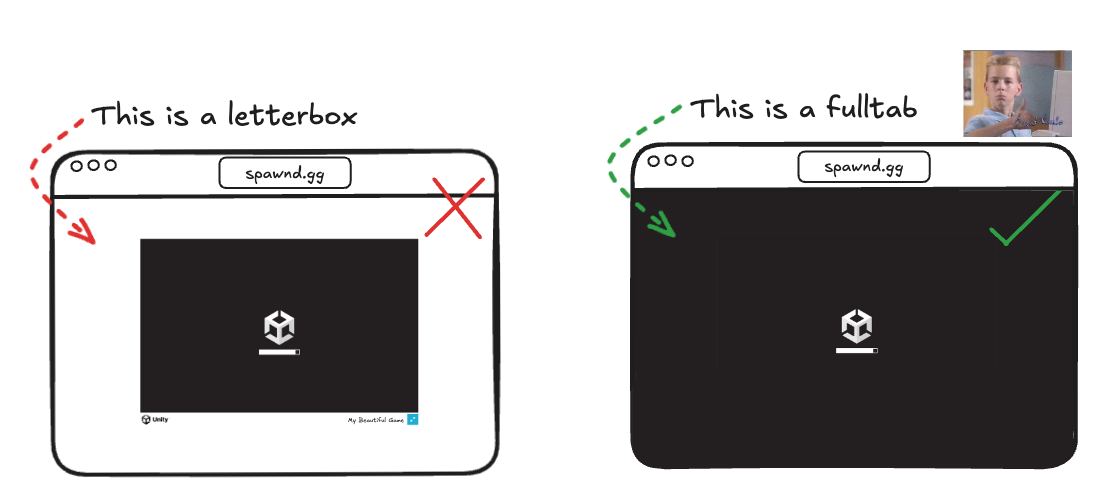
stylistic, intentional letterboxing already present in the desktop version is ok!
check out our running the game in fulltab (Unity) article on how to achieve this.
note that "fulltab" is not the same as "fullscreen". "fulltab" fills the browser's canvas while maintaining the browser address bar/controls still visible.
avoid entering or exit fullscreen within your game as the spawnd player already manages those states. If you'd prefer to have control over entering/exiting fullscreen, then make sure to do so with a clear and explicit option to your players (ie. with an option within the game's menu)
performance targets
- achieve at least 40 FPS on reference hardware (desktop-only support for the time being);
- OS: Windows 10 64-bit or later
- RAM: 8 GB minimum
- CPU: at least 4 physical cores, ≥2.0 GHz base (modern x86_64)
- GPU / graphics capability: DirectX 11+ class with full WebGL2 support (DX12-capable preferred)
- display target: 1920×1080 @ 60 Hz
tou can test WebGL2 compatibility here.
reserved keys replacement and inputs
lock keyboard and mouse inputs on start (gamepad is supported);
if your standalone demo supports gamepads, your spawnd build should too!
make sure to replace reserved keys to avoid UI conflicts
- [ESC] key is reserved by the browser to exit fullscreen and also to "minimize" the embed window window sessions
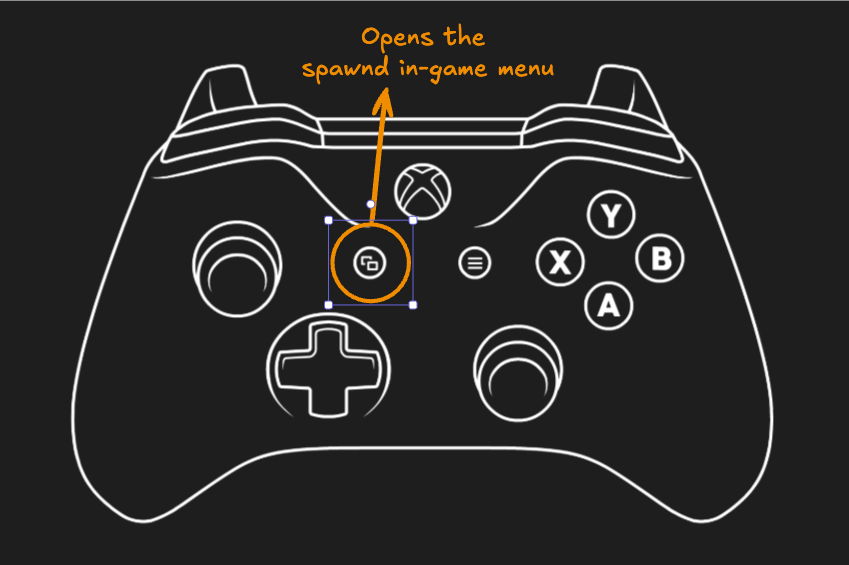
- [~] or [`] ("backquote") key is reserved by spawnd to open the system menu


spawnd in-game menu
- the gamepad ["select"] (also called "share" or "back") button is also reserved by spawnd to open the system menu
embed compatibility
your game must work within our embed (must not break inside <iframe>);
make sure your game automatically pauses execution (or at least mutes audio playback) when the browser canvas loses focus. this allows for a much better experience where users who tried your demo in an embed, don't get bothered by the game or the game's audio running in the background while they scroll the page or check another tab.
this is already the default behavior on Unity's webGL builds, but may need to be enabled in some cases or manually implemented on other engines.
load time and build size
the game should ideally start in a few seconds. long loading screens will harm conversion!
this is a subjective number that will vary for each game, but it should still be sensible. use a standard broadband connection speed for reference when testing.
suggested build size: 500Mb, max build size: 3 GB.
- while larger games are acceptable, large builds may make games initialization slower and may increase users bounce rate.
- you should aim for fast initial load times (i.e. load start to title menu in under 20 seconds), even if the rest of the game is being downloaded in the background (see our web porting huides section for optimization tips).
- not rely on mobile or touch input (mobile gameplay is not officially supported for now).
no external launchers or login walls
no launchers or external logins are allowed at this time
spawnd enables demos to be played anywhere and shared via simple URLs or embedded on media and partner sites. as such, these games must operate independently of a launcher or external login flow and must support seamless playback.
For strictly necessary logins, such as in multiplayer games, contact the spawnd team ;)).
dealing with exit game menu options
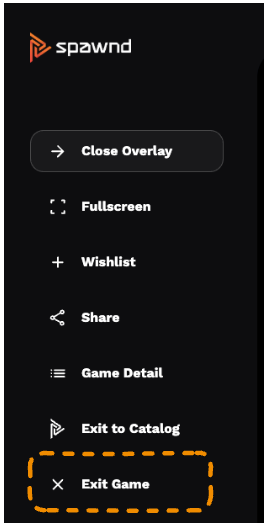
many games and demos today employ [Exit Game] menu options for its users, however while these options are appropriate for Steam and console games, on web browsers they unfortunately will not work.
for that reason we recommend you remove any such option from your game's menu, as the spawnd contextual menu already contains an option to close the game.
you may, alternatively, change the menu option to guide to users to press the [`] (also known as "backqoute" key) or the gamepad's [select] button to open the spawnd menu and close the game.
other topics
game engines
there are no requirements about the game engines used to develop your demo. as long as it complies with the requirements above and runs smoothly in the browser, your demo is eligible for spawnd!
Updated 7 months ago