

tracking players on spawnd
spawnd is more than just a way to generate wishlists and gameplay sessions. it’s also built to provide deep analytics and insights that help studios and publishers truly understand their audiences and improve their games.
introduction
by tracking over 700+ raw data points across spawnd and external embeds, our analytics give you visibility into how players discover, interact with, and share your games. beyond measuring visibility, spawnd helps you uncover patterns in player behavior that can guide your marketing, inform your community strategy, and even influence how you improve your games themselves.
our mission is simple: deliver clear, actionable data that empowers developers to grow their games smarter and faster.
spawnd tracks hundreds of events and attributes across both our internal platform (spawnd.gg) and external embeds that unlock 33,000 potential ways to analyze your game performance. these analytics are designed to give developers and publishers clear insights into how players are discovering, engaging with, and sharing your demos. From impressions on a cover capsule to playtime percentile distributions, the system surfaces actionable data without requiring complex integrations.
our goal is to provide easy-to-understand, actionable metrics that help you validate visibility, measure engagement, and ultimately drive wishlist conversions. new feautures will continue to being added continuously, so make sure to chek back often!
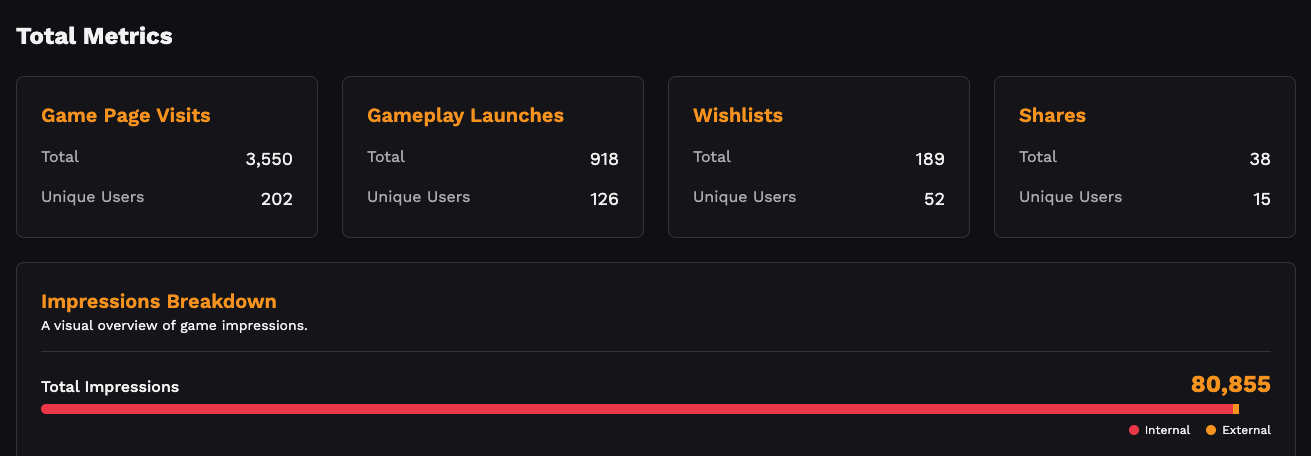
how spawnd analytics works?
spawnd tracks interactions in several different ways, with the two main ways being "actions"/"events" (like when a user clicks something on spawnd) and "UTM tracking" (when a spawnd link/embed drives users to platforms like Steam). by combining these data points, spawnd is able to accuratly track player throughout their journey of discovering, trying and engaging with your game (ie. on Steam).
dashboard overview
this is the first version of our analytics dashboard. new features and deeper reporting will be added continuously as we expand functionality.
today, you can already track key metrics such as impressions, unique players, playtime percentiles, wishlist clicks, and sharing activity both within spawnd pages as well as the embedded player, wherever they may be!
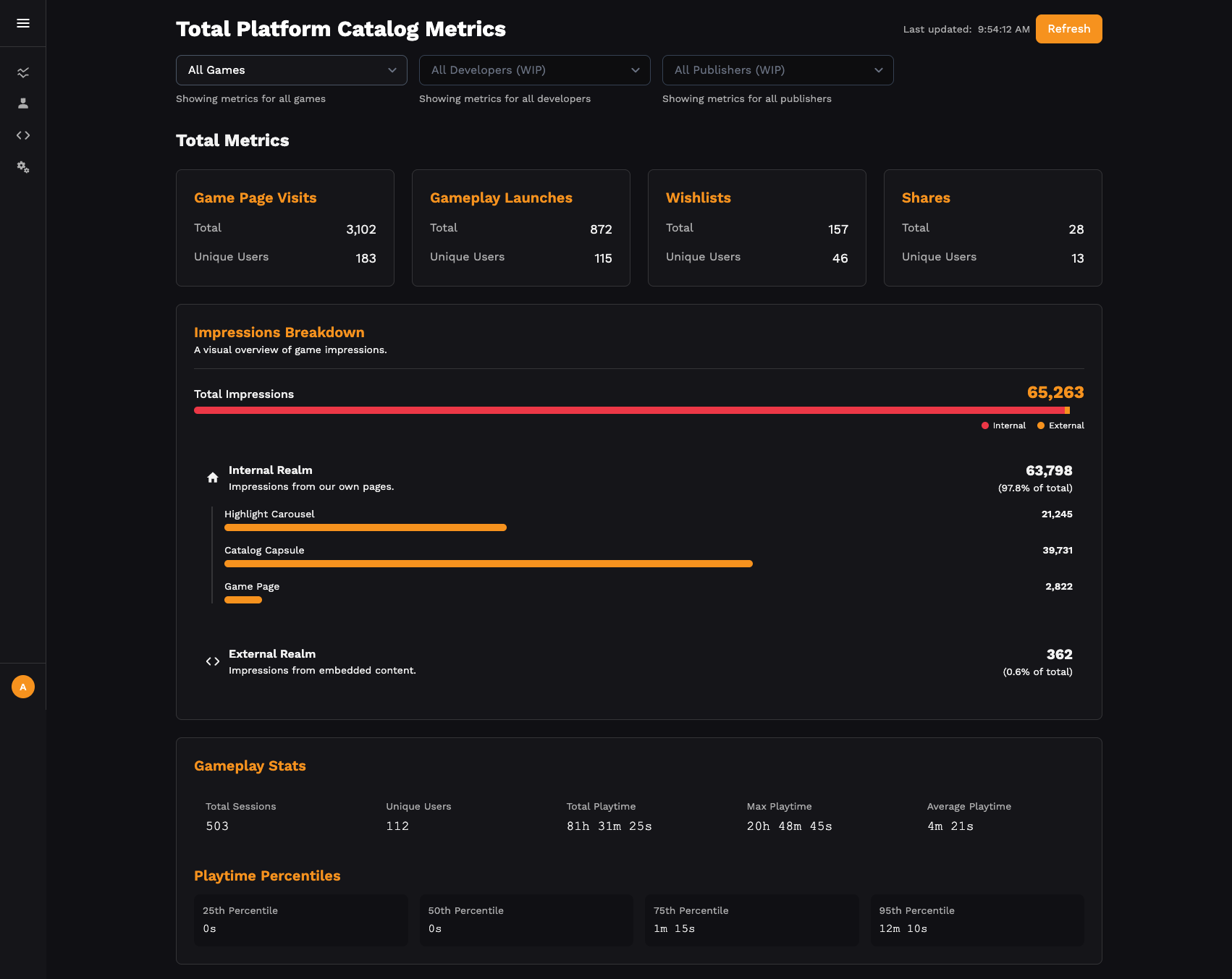
A preview of the spawnd analytics dashboard
metrics explained
-
impressions: every event where a user sees your game art or cover. this includes:
- highlight carousel: large carousel on spawnd’s homepage.
- catalog capsule: a cover image of your game, which may appear multiple times across different pages.
- embeds: any external website where your demo is embedded.
-
internal vs. external
- internal: actions within the spawnd platform.
- external: actions happening via embedded games on third-party websites.
-
play sessions & playtime percentiles
tracks how long players spend in your demo. players are grouped into percentiles to help you understand engagement depth. -
wishlist clicks
counts whenever a user clicks a wishlist button, presses the keyboard shortcut, or uses a gamepad shortcut that leads to your Steam page.
⚠️ note: this indicates intent but does not guarantee the user completed the wishlist action on Steam (they may not be logged in or may drop off). -
sharing actions
tracks every instance of your game being shared via URL or embed code.
how spawnd UTMs tracking work
UTMs, or UTM parameters, are very important small bits of text added to the end of a website link. they help you understand where visitors are coming from when they click on your links (and should be part of every game dev strategy!).
https://example.com?utm_source=spawnd_gg&utm_medium=ad&utm_campaign=summer_salethink of them like name tags for links.
when someone clicks this link, you’ll know:
- utm_source=spawnd_gg → the visitor came from spawnd
- utm_medium=ad → it was from an ad
- utm_campaign=summer_sale → it was part of your summer sale campaign
this is very useful for tracking which pages, posts, or platforms are actually sending people to your game/studio page, so you can focus on what works best.
spawnd employs UTMs when linking into your Steam pages. this allows for a coherent funnel that will show you exactly how users from spawnd engaged with your game once they've landed on Steam, be it wishlisting it or even buying your game.
so every time a user clicks a link from spawnd to a Steam page — whether through a wishlist button, game page button, or shortcut — we automatically append the following UTM parameter to the link:
?utm_source=spawnd_ggthis allows Steam to attribute that traffic from spawnd within their own analytics dashboards.
to guarantee better tracking developers should also ensure that any Steam links they add to their demos include the same UTM parameter above.
examples links:
https://store.steampowered.com/app/YOUR_APP_ID?utm_source=spawnd_ggor
https://store.steampowered.com/sale/SALE_NAME?utm_source=spawnd_gg⚠️ important: Steam only tracks UTMs sent to app pages or sale pages. links to other areas of Steam will not be tracked.
learn more about how Steam deals with UTMs here: https://partner.steamgames.com/doc/marketing/utm_analytics
tracking challenges
like any analytics system, tracking has limitations:
- adblockers and privacy tools may block some events, though spawnd’s system is designed to minimize this risk by collecting events first-party.
- Steam only records UTM tags on app and sale pages—so other Steam links won’t show attribution.
- wishlist clicks are proxies for wishlist intent; final conversion happens on Steam’s side, outside our visibility.
FAQ
Q: why don’t my Steam analytics show all the traffic I see in spawnd?
A: Steam only tracks UTMs for app and sale pages. other outbound links won’t appear in their analytics. also make sure your interal demo links have the correct spawnd UTM.
Q: why is my wishlist count lower than expected?
A: wishlist clicks on spawnd reflect intent, but users may not follow through on Steam. some may not be logged into their Steam account.
Q: are impressions reliable if my game shows up multiple times on a page?
A: yes. each cover view is counted as a separate impression, since every instance has visibility value and represents a potential click.
Q: can I export this data?
A: CSV/JSON export is not available in the first version but is planned for a future release.
Q: do embeds track the same way as the spawnd site?
A: yes. impressions, plays, shares, and wishlist clicks from external embeds are all tracked and reported. these appear on our dashboard as "external"
next steps
spawnd analytics will continue to evolve with more granular filters, benchmarks, and AI-driven insights. this is just the beginning—our mission is to make analytics as frictionless and useful as the games themselves.
Updated 5 months ago